
Introduction
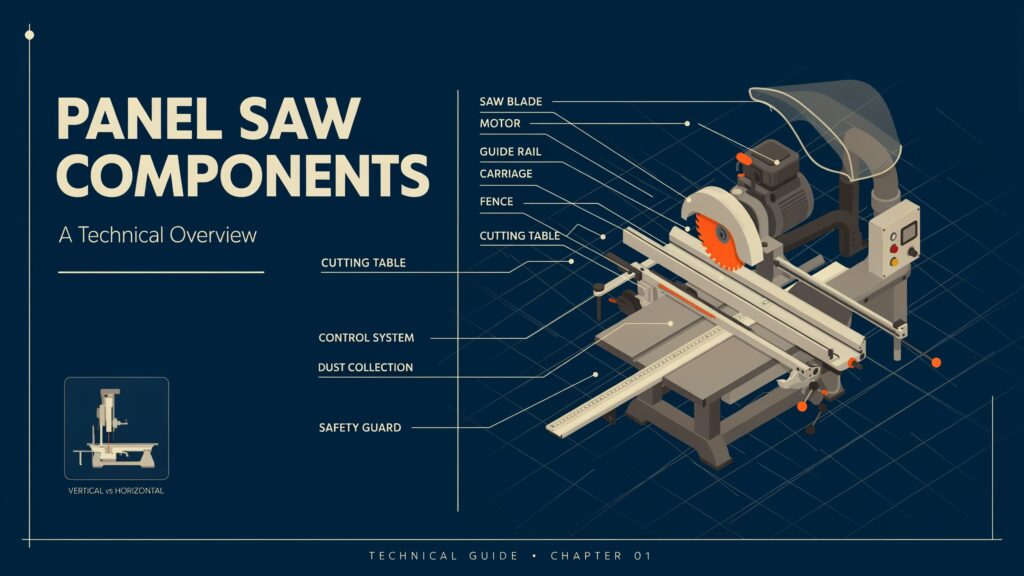
Knowing the main panel saw components helps users operate, maintain, and fix the machine properly. A panel saw is made up of many components, including the saw blade, motor, guide rail, carriage, fence, cutting table, control system, dust collection system, and safety features. Each component has a specific function and works together to provide accurate and controlled cuts.
Knowing how these components work can help users identify common problems, perform basic maintenance, improve cutting accuracy, and operate the machine more safely. In this guide, we will explain the main components, their functions, maintenance requirements, common problems, and the differences between vertical and horizontal machine designs.
Table of Contents
Main Panel Saw Components and Their Functions
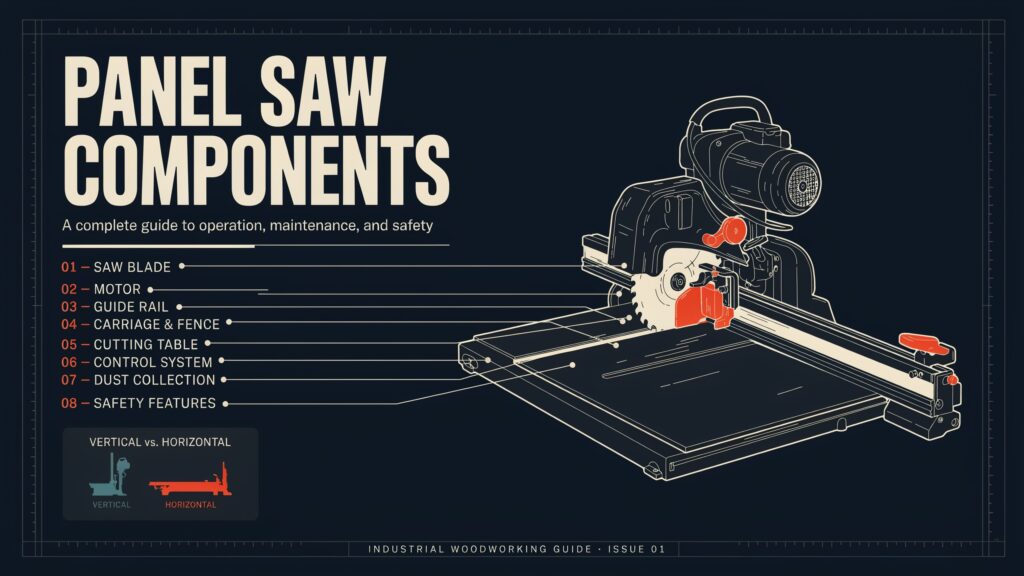
A panel saw contains many mechanical, electrical, and safety components that work together to cut large sheets accurately. Each component has a specific function, from supporting the workpiece to controlling the blade and removing cutting dust. Understanding these components makes it easier to operate, inspect, maintain, and troubleshoot the machine.
1. Main Saw Blade
The main blade cuts through the material as its fast-moving teeth create a smooth, straight edge.
2. Scoring Blade
A scoring blade makes a shallow preliminary cut on the surface of certain materials. It helps reduce chipping and improves the edge quality of laminated panels.
3. Blade Arbor
The blade arbor is the shaft that holds the saw blade in position. It transfers rotational movement from the drive system to the blade.
4. Blade Guard
A blade guard covers part of the rotating blade to reduce accidental contact. It is an important safety component during cutting operations.
5. Main Motor
The main motor provides the power required to rotate the cutting blade. Motor capacity can affect cutting performance, especially when working with thick or dense materials.
6. Scoring Motor
Some machines have a separate motor for the scoring blade. It allows the smaller blade to rotate independently and prepare the material before the main cut.
7. Drive System
The drive system transfers power from the motor to the cutting mechanism. Depending on the machine design, it may include belts, pulleys, gears, or direct-drive components.
8. Cutting Unit
The cutting unit contains the mechanism responsible for moving and operating the saw blade. It is one of the most important parts of the machine because it performs the actual cutting operation.
9. Cutting Table
The cutting table provides a stable surface for supporting sheet materials during cutting. A flat and properly maintained surface helps improve cutting accuracy.
10. Sliding Carriage
The sliding carriage helps move the workpiece or cutting assembly along a controlled path. Smooth carriage movement is important for producing straight and consistent cuts.
11. Guide Rail
The guide rail provides a controlled path for the carriage or cutting unit. It helps maintain a straight cutting direction and reduces unwanted movement.
12. Rip Fence
The rip fence helps position the workpiece at a consistent distance from the blade. It is particularly useful when making repeated cuts of the same width.
13. Crosscut Fence
A crosscut fence helps position panels for cuts across their width. It provides a reference point that supports accurate measurement and positioning.
14. Measuring Scale
The measuring scale helps the operator determine the required cutting position. Accurate measurements reduce material waste and improve consistency.
15. Material Support
Material supports hold large panels in a stable position during cutting. They are especially useful when handling large or heavy sheets.
16. Workpiece Support Rollers
Support rollers allow large panels to move more easily across the machine. They reduce friction and make material handling more convenient.
17. Panel Support Frame
A support frame provides structural support for the material, particularly on vertical machines. It helps keep the panel properly positioned during cutting.
18. Pressure Beam
On some automated machines, a pressure beam keeps the material in place during cutting, helping prevent movement and improve accuracy.
19. Clamping System
The clamping system secures the material during the cutting process. Proper clamping can reduce unwanted movement and improve the consistency of repeated cuts.
20. Control Panel
The control panel allows the operator to manage different machine functions. Depending on the model, it may include controls for starting, stopping, positioning, and adjusting the cutting operation.
21. Start Button
The start button activates the machine or selected operating function. It should only be used after the work area and material have been checked.
22. Stop Button
The stop button allows the operator to stop normal machine operation. It is used when the cutting task is complete or when the machine needs to be stopped safely.
23. Emergency Stop Button
The emergency stop button provides a quick way to stop machine operation during an unsafe or unexpected situation. It should remain easily accessible to the operator.
24. Blade Height Adjustment
The blade height adjustment mechanism allows the cutting depth to be changed. Correct blade height helps match the cutting setup to the thickness of the material.
25. Blade Angle Adjustment
Some panel saws allow the blade angle to be adjusted for angled cuts. This mechanism helps the operator set the required cutting angle accurately.
26. Spindle Assembly
The spindle assembly supports and rotates the cutting blade. It must remain properly aligned and maintained for stable cutting performance.
27. Linear Bearings
Linear bearings help components such as the carriage move smoothly along their guide surfaces. Proper lubrication and maintenance can help prevent rough movement.
28. Adjustment Mechanism
Adjustment mechanisms allow the operator to fine-tune machine settings. They may control blade position, fence alignment, cutting depth, or other operating parameters.
29. Electrical Control System
The electrical control system manages power and machine functions. It may include switches, relays, sensors, wiring, and other electrical components.
30. Limit Switches
Limit switches detect when a moving component reaches a specific position. They can help control machine movement and prevent certain components from traveling beyond their intended limits.
31. Dust Extraction Port
The dust extraction port links the machine to a collection system, helping remove sawdust and debris from the cutting area.
32. Dust Collection System
The dust collection system removes sawdust generated during cutting. Effective dust extraction can improve visibility, reduce airborne particles, and help keep the work area cleaner.
33. Chip Deflector
A chip deflector helps direct sawdust and small pieces away from the cutting area. It can work together with dust extraction equipment to improve debris control.
34. Machine Frame
The machine frame provides the main structural foundation. A strong frame helps keep the cutting system stable and properly aligned during operation.
35. Leveling Feet
Leveling feet support the machine and allow its position to be adjusted on the workshop floor. Proper leveling can help maintain stability during cutting.
36. Safety Switches
Safety switches stop the machine from running in unsafe situations and may work with guards, access doors, or other safety devices.
37. Electrical Cabinet
The electrical cabinet houses important electrical control components. It protects wiring and control equipment while providing organized access for qualified maintenance personnel.
38. Protective Covers
Protective covers shield moving or electrical components from accidental contact, dust, and debris. They also help keep important machine mechanisms protected during normal operation.
39. Material Measuring System
A measuring system helps users place the material correctly before cutting. Advanced machines may use digital screens or automatic positioning for more accurate results.
40. Alignment System
The alignment system helps keep the blade, fence, carriage, and workpiece correctly positioned relative to one another. Proper alignment is essential for accurate cuts and consistent results.
Understanding these panel saw components and functions helps operators identify what each part does and why proper setup matters. When the cutting unit, guide system, material support, electrical controls, and safety features work together correctly, the machine can produce accurate and repeatable cuts.
Saw Blade and Cutting Unit
The saw blade and cutting unit are central to the cutting process. Together, they control how the machine cuts plywood, MDF, particleboard, laminate, and other sheet materials. Proper blade selection, alignment, and adjustment are important for achieving clean and accurate results.
1. Main Saw Blade
The main blade does most of the cutting work. Its teeth pass through the material at high speed and remove material to create the required cut. Blade diameter, tooth design, and cutting capacity should match the machine and workpiece.
2. Scoring Blade
A scoring blade makes a shallow cut before the main blade passes through the material. It is particularly useful when cutting laminated or coated panels because it can help reduce chipping along the finished surface.
3. Blade Arbor
The blade arbor is the shaft that holds the blade securely. It transfers rotational power from the spindle assembly or drive system to the blade. Correct blade mounting is essential for stable operation.
4. Blade Flanges
Blade flanges hold the saw blade firmly against the arbor. They help keep the blade centered and stable while it rotates. Clean and properly fitted flanges can help reduce unwanted blade movement.
5. Cutting Unit
The cutting unit contains the main mechanism that carries and operates the saw blade. Depending on the machine design, it may include the motor, spindle, blade assembly, and adjustment mechanisms.
6. Cutting Motor
The cutting motor supplies the rotational power needed by the blade. A suitable motor provides consistent performance when cutting materials of different thicknesses and densities.
7. Spindle Assembly
The spindle assembly supports the blade and transfers rotational movement to it. Accurate spindle alignment is important because excessive movement or misalignment can affect the quality of the cut.
8. Blade Height Adjustment
The blade height adjustment allows the operator to set the blade to the appropriate cutting depth. The correct setting helps the blade cut through the material efficiently without unnecessary exposure.
9. Blade Angle Adjustment
Some machines allow the cutting blade to tilt for angled cuts. The blade angle adjustment mechanism helps the operator set the required angle accurately for specific woodworking applications.
10. Blade Guard
A blade guard covers part of the rotating blade and helps reduce the risk of accidental contact. It is an important safety feature and should remain correctly installed during normal operation.
11. Cutting Direction
The cutting unit must move in the intended direction while the material remains properly supported. A controlled cutting path helps maintain straight and consistent results.
12. Blade Alignment
The blade should remain properly aligned with the guide system, fence, and workpiece. Poor alignment can produce uneven cuts, increase material waste, and place unnecessary stress on the cutting system.
13. Blade Tooth Design
Different blade tooth designs are suited to different materials and cutting requirements. Tooth count, tooth shape, and spacing can influence cutting speed, surface quality, and chip formation.
14. Cutting Capacity
The cutting capacity depends on factors such as blade diameter, motor power, blade position, and machine design. Always operate within the manufacturer’s specified limits for the machine and blade.
15. Blade Maintenance
Regular inspection helps identify worn, damaged, or dirty blades. A dull or damaged blade can produce rough edges, increase cutting resistance, and place additional load on the motor.
16. Cutting Accuracy
The cutting unit works together with the guide rail, carriage, fence, and measuring system to maintain accuracy. Proper alignment and smooth movement are especially important when making repeated cuts.
17. Dust and Chip Removal
Cutting produces sawdust and small chips that can interfere with visibility and machine operation. A suitable dust extraction system helps remove debris from around the cutting area.
18. Safe Operation
Before operating the cutting unit, check the blade, guards, material position, and machine settings. Keep hands away from the cutting path and follow the manufacturer’s operating and safety instructions.
A properly maintained saw blade and cutting unit provide the foundation for accurate panel cutting. Regular inspection, correct adjustment, suitable blade selection, and proper alignment can improve both cutting quality and machine performance.
Motor and Drive System
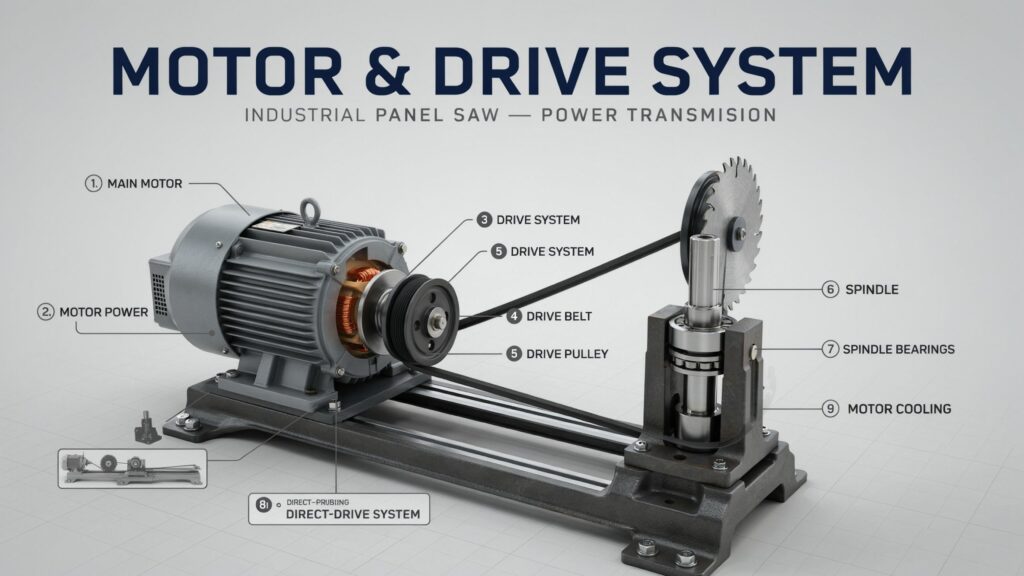
The motor and drive system provide the power needed to operate the cutting mechanism. They control the rotation of the saw blade and help the machine maintain consistent cutting performance when working with materials such as plywood, MDF, particleboard, and laminated panels.
1. Main Motor
The main motor powers the saw blade and affects how well the machine cuts materials of different thicknesses. A suitable motor helps the machine cut smoothly without extra strain.
2. Motor Power
Motor power determines how much cutting load the machine can handle under normal operating conditions. Higher power can be useful for demanding applications, but the motor should always be operated within the specifications provided by the manufacturer.
3. Drive System
The drive system transfers mechanical power from the motor to the cutting mechanism. Depending on the machine design, it may use belts, pulleys, gears, or a direct-drive arrangement.
4. Drive Belt
A drive belt carries power from the motor to other moving parts. Correct belt tension prevents slipping and reduces stress on the motor and bearings.
5. Drive Pulley
The drive pulley transfers rotation through the belt system. Its size and condition can affect how efficiently power is transmitted to the cutting mechanism.
6. Spindle
The spindle is the rotating shaft that carries the saw blade. It receives power from the drive system and transfers that movement to the blade during cutting.
7. Spindle Bearings
Spindle bearings support the rotating shaft and allow it to operate smoothly. Worn or damaged bearings can cause vibration, noise, or reduced cutting accuracy.
8. Direct-Drive System
Some machines use a direct-drive system in which the motor connects directly to the cutting spindle. This design can reduce the number of moving transmission components and provide direct power transfer.
9. Belt-Drive System
A belt-drive system uses belts and pulleys to transfer power between the motor and spindle. It can provide flexibility in machine design and allows certain components to be positioned separately.
10. Motor Cooling
Motors produce heat while running, especially under heavy loads. Cooling systems help control the temperature and prevent overheating.
11. Motor Housing
The motor housing protects the motor’s internal components from dust, debris, and accidental contact. It also provides structural support for the motor assembly.
12. Electrical Control
The electrical control system manages the motor’s operation. It may include switches, contactors, circuit protection, and other components that control when and how the motor operates.
13. Start and Stop Controls
Start and stop buttons let the operator turn the motor on or off. They should be easy to reach and used as directed in the machine’s manual.
14. Emergency Stop
An emergency stop system allows the machine to be stopped quickly when an unsafe condition occurs. It is an important part of the machine’s overall safety system.
15. Power Transmission
Power transmission describes how mechanical energy travels from the motor to the cutting unit. Efficient transmission helps maintain stable blade rotation and consistent cutting performance.
16. Motor Alignment
Correct motor and drive alignment helps reduce unnecessary vibration and mechanical stress. Misalignment can contribute to uneven wear on belts, pulleys, bearings, and other components.
17. Drive System Maintenance
Regular inspection should include checking belts, pulleys, bearings, electrical connections, and mounting points. Maintenance should always follow the manufacturer’s instructions and be performed with the machine safely isolated from its power source.
18. Effect on Cutting Performance
A properly functioning motor and drive system helps the blade maintain stable rotation during cutting. Problems with power transmission can lead to slower cutting, vibration, rough edges, or increased stress on the machine.
The motor and drive system work together with the cutting unit, spindle assembly, and electrical controls to provide reliable machine operation. Proper maintenance, correct alignment, and operation within the manufacturer’s limits are essential for safe and consistent performance.
Guide Rail, Carriage, and Fence
The guide rail, carriage, and fence form an important part of the machine’s positioning and guiding system. They help control the movement of the cutting unit or workpiece and make it easier to produce straight, accurate, and repeatable cuts.
1. Guide Rail
The guide rail directs the carriage or cutting unit along a straight path, helping prevent sideways movement and ensuring accurate cuts.
2. Sliding Carriage
The sliding carriage allows the cutting unit to travel smoothly along its guide system. Its movement should remain stable and controlled to help produce consistent cuts across large panels.
3. Rip Fence
The rip fence provides a reference point for positioning the material in relation to the saw blade. It is particularly useful when making multiple cuts with the same width.
4. Crosscut Fence
A crosscut fence helps position the workpiece for cuts across its width. It provides a reliable reference surface that helps maintain consistent measurements.
5. Carriage Bearings
Carriage bearings allow the carriage to move smoothly along its guide surfaces. Clean and properly maintained bearings can reduce friction and unwanted movement.
6. Guide Surface
The guide surface supports controlled movement of the carriage. It needs to remain clean and properly aligned so that dust and debris do not interfere with smooth operation.
7. Fence Scale
A fence scale provides measurement markings that help the operator position the fence at the required distance. Accurate readings are important when preparing panels for repeated cuts.
8. Fence Adjustment Mechanism
The adjustment mechanism allows the fence to be moved and locked into the desired position. A secure locking mechanism helps prevent the fence from shifting during cutting.
9. Carriage Lock
A carriage lock can hold the carriage in a specific position when required. This helps prevent unwanted movement during setup or certain cutting operations.
10. Guide Rail Alignment
Proper guide rail alignment is essential for accurate cutting. If the rail is misaligned, the cutting path may deviate from the intended measurement.
11. Fence Alignment
The fence should remain correctly aligned with the cutting system. Poor alignment can cause inaccurate dimensions, uneven cuts, and unnecessary material waste.
12. Measuring Scale
A measuring scale helps the operator determine the position of the material or fence before making a cut. Some modern machines may use digital measurement systems instead of traditional scales.
13. Material Positioning
The guide system and fence help establish the correct position of the workpiece before cutting. Proper positioning is especially important when working with large sheets.
14. Sliding Movement
Smooth sliding movement allows the carriage or cutting assembly to travel without unnecessary resistance. Rough movement can affect cutting accuracy and place additional stress on machine components.
15. Locking Mechanism
Locking mechanisms secure adjustable components after they have been positioned. A properly locked fence or guide helps maintain the selected measurement during cutting.
16. Carriage Maintenance
Check the carriage often for dirt, damage, loose parts, or unusual movement. Follow the manufacturer’s instructions for proper maintenance.
17. Guide Rail Cleaning
Dust and debris can accumulate on guide surfaces and interfere with smooth movement. Regular cleaning helps maintain consistent carriage operation.
18. Fence Maintenance
The fence should remain clean, straight, and securely attached. Any looseness or damage can affect material positioning and cutting accuracy.
19. Cutting Accuracy
The guide rail, carriage, and fence work together to keep the workpiece and cutting unit properly positioned. Correct adjustment of these components is essential for accurate and repeatable results.
20. Importance of the Guiding System
A reliable guiding system makes it easier to control large panels during cutting. When the guide rail, carriage, and fence are properly aligned and maintained, the machine can produce straight cuts with consistent dimensions.
The guide rail, carriage, and fence are therefore essential for accurate material positioning and controlled cutting. Regular inspection, cleaning, alignment, and adjustment help maintain their performance and extend the useful life of the machine.
Panel Saw Table and Material Support
The table and support system hold large sheets steady during cutting. They help keep the material flat, prevent movement, and improve cutting accuracy.
1. Cutting Table
The cutting table supports the workpiece while the saw blade passes through it. A strong, level surface helps maintain stability and provides a reliable foundation for accurate cutting.
2. Material Support
Material supports keep large panels in place during cutting, especially when handling heavy or oversized sheets.
3. Workpiece Support
Workpiece support keeps the material stable and reduces movement during the cutting process. Proper support can also help prevent the panel from bending or shifting unexpectedly.
4. Support Rollers
Support rollers help move large sheets smoothly across the machine by reducing friction and making material handling easier.
5. Infeed Support
The infeed support provides a stable area where the material can be positioned before it enters the cutting area. It is useful when handling large sheets that extend beyond the main table.
6. Outfeed Support
The outfeed support holds the material as it leaves the cutting area, helping prevent the cut panel from falling or moving out of place.
7. Extension Table
An extension table provides additional support for large workpieces. It increases the usable working area and can make handling oversized panels easier.
8. Table Surface
Keep the table flat, clean, and free of damage or debris to help the material stay in place during cutting.
9. Material Stops
Material stops provide reference points for positioning panels. They help the operator place workpieces consistently when making repeated cuts.
10. Panel Support Frame
A support frame holds the material steady and helps handle large sheets safely during cutting.
11. Vacuum Support
Some advanced machines use vacuum systems to hold panels in position. Vacuum support can help reduce movement during automated cutting operations.
12. Air Cushion System
Certain panel cutting machines use an air cushion to reduce friction between the workpiece and table surface. This can make large panels easier to move and position.
13. Table Alignment
The table must line up correctly with the blade to keep the material positioned properly and prevent inaccurate cuts.
14. Table Leveling
A level table provides consistent support across the workpiece. If the table is uneven, large panels may not sit properly, which can affect cutting accuracy.
15. Material Positioning
The support system helps the operator position the sheet according to the required measurement. Correct positioning is essential before starting the cutting operation.
16. Panel Stability
Stable material support reduces unwanted movement during cutting. This can help improve the quality of the finished edge and reduce the risk of inaccurate dimensions.
17. Material Handling
Large sheets are heavy and hard to handle. Table extensions, rollers, and support surfaces help move them more easily and safely.
18. Support Maintenance
Table surfaces, rollers, stops, and other support components should be inspected regularly. Dust, debris, loose components, or damaged surfaces can interfere with material movement.
19. Support for Large Panels
Large panels require sufficient support before, during, and after cutting. Unsupported sections can sag or move, which may affect the cutting path and create handling problems.
20. Importance of Stable Support
A stable cutting table and material support system help keep the workpiece in the correct position throughout the cutting process. When these components are clean, level, and properly maintained, they contribute to safer handling and more consistent results.
The table and support system work together with the guide rail, fence, carriage, and cutting unit to control the workpiece. Proper support is especially important when cutting large sheets of plywood, MDF, particleboard, and other panel materials.
Control Panel, Adjustment, and Operating Mechanisms
The control panel and adjustment mechanisms allow the operator to manage the machine and set the cutting parameters before starting a job. These systems help control the cutting unit, blade position, material positioning, and other operating functions.
1. Control Panel
The control panel provides access to the machine’s main operating controls. Depending on the model, it may include switches, buttons, displays, indicators, and controls for different cutting functions.
2. Start Button
The start button activates the machine or a specific operating function. Before pressing it, the operator should ensure that the workpiece is correctly positioned and the cutting area is clear.
3. Stop Button
The stop button is used to stop normal machine operation. It allows the operator to shut down the cutting process when the task is complete or when operation needs to be paused.
4. Emergency Stop Button
The emergency stop button provides a quick way to stop the machine during an unsafe or unexpected situation. It should remain easy to reach while the machine is operating.
5. Control Switches
Control switches allow the operator to turn specific functions on or off. Their exact purpose varies between machines and should be identified using the manufacturer’s operating instructions.
6. Digital Display
Some modern machines include a digital display showing information such as measurements, settings, operating status, or error messages. This can make machine setup easier and more precise.
7. Blade Height Adjustment
The blade height adjustment mechanism changes how far the saw blade extends relative to the workpiece. The correct setting should be selected according to the material and manufacturer’s recommendations.
8. Blade Angle Adjustment
A blade angle adjustment allows the cutting blade to be tilted when angled cuts are required. A clear angle scale or digital indicator can help the operator select the desired position.
9. Fence Adjustment
The fence can be adjusted to the desired measurement and must be locked firmly before cutting.
10. Carriage Adjustment
Carriage adjustment controls the position or movement of the sliding carriage. Proper adjustment helps the cutting unit travel smoothly along its guide system.
11. Measuring System
The measuring system helps determine the correct position of the workpiece, fence, or cutting unit. Depending on the machine, it may use a mechanical scale, digital display, or automated positioning system.
12. Positioning Controls
Positioning controls allow the operator to set or change the location of certain machine components. Accurate positioning is important when producing panels with precise dimensions.
13. Locking Mechanisms
Locking mechanisms hold adjustable parts in place and stop the fence, carriage, or settings from shifting during cutting.
14. Operating Levers
Some machines have levers for adjusting or positioning parts. Use these levers according to the manufacturer’s instructions.
15. Adjustment Handwheels
Handwheels may be used to make precise mechanical adjustments. They can control blade height, angle, fence position, or other settings depending on the machine.
16. Limit Controls
Limit controls determine how far certain moving components can travel. They help keep the machine’s movement within its designed operating range.
17. Electrical Controls
Electrical controls manage the flow of power to different machine functions. They may include switches, contactors, relays, circuit protection, and control wiring.
18. Operating Indicators
Indicator lights or display messages can show whether the machine is powered, running, stopped, or experiencing a fault. These indicators help the operator understand the machine’s current status.
19. Automated Positioning
Advanced machines may use automated positioning to move fences or cutting components to programmed measurements. This can improve repeatability and reduce manual setup time.
20. Control System Maintenance
Check the control panel and adjustment parts regularly for damage, loose fittings, or unusual behavior. Qualified technicians should handle electrical repairs according to the manufacturer’s instructions.
Correct use of the control panel, adjustment mechanisms, and operating controls helps the machine perform consistently. Before cutting, operators should verify the blade position, fence setting, material placement, and other required adjustments to ensure the machine is properly configured.
Dust Collection and Safety Components
Dust collection and safety systems play an important role in keeping the cutting area cleaner and reducing risks during machine operation. Cutting materials such as MDF, plywood, and particleboard can produce significant amounts of sawdust and fine particles, so proper extraction and protective features are important.
1. Dust Extraction Port
The dust extraction port connects the machine to a dust collector, helping remove sawdust and debris from the cutting area.
2. Dust Collection System
A dust collection system removes sawdust generated during cutting. Effective extraction can improve visibility around the blade and help keep the workshop cleaner.
3. Dust Hood
A dust hood surrounds or partially covers the cutting area and helps capture dust close to where it is produced. It is often connected to a suitable extraction system.
4. Chip Deflector
A chip deflector helps direct wood chips and debris away from the cutting path. It can improve debris control when used with appropriate dust extraction.
5. Dust Ducting
Dust ducting carries extracted air and debris from the machine to the collection unit. Properly installed ducting helps maintain effective airflow.
6. Dust Collector
The dust collector receives and stores the material removed from the cutting area. Its capacity and airflow should be suitable for the machine and type of material being cut.
7. Blade Guard
The blade guard covers part of the rotating saw blade and helps reduce the chance of accidental contact. It should be correctly installed and used according to the machine manufacturer’s instructions.
8. Safety Switches
Safety switches can prevent or stop machine operation when certain safety conditions are not met. Their exact function depends on the machine’s design.
9. Emergency Stop Button
The emergency stop button provides a quick method of stopping the machine when an immediate hazard occurs. It should always remain accessible to the operator.
10. Protective Covers
Protective covers shield moving mechanical and electrical components from accidental contact. They also help prevent dust and debris from reaching certain internal parts.
11. Safety Interlocks
Safety interlocks can prevent machine operation when a guard, cover, or access point is not in the required position. They are designed to reduce the possibility of unsafe operation.
12. Electrical Protection
Electrical protection components help protect the machine’s electrical system from certain faults and abnormal conditions. These components should only be inspected or serviced by qualified personnel when required.
13. Blade Visibility
The operator needs a clear view of the workpiece and cutting area while maintaining a safe position. Excessive dust can reduce visibility, which makes effective extraction important.
14. Material Stability
Properly supporting and securing the workpiece helps prevent unexpected movement during cutting. The guide system, fence, table, and material supports all contribute to stable operation.
15. Noise Control
Panel saws can produce significant noise during operation. Depending on the workplace and machine, appropriate hearing protection may be necessary.
16. Personal Protective Equipment
Suitable personal protective equipment may include safety glasses, hearing protection, and other equipment appropriate to the workplace. PPE should complement, rather than replace, machine guards and other safety controls.
17. Dust Filter
Some extraction systems use filters to capture fine particles before the cleaned air is released. Filters need appropriate maintenance to maintain airflow and collection performance.
18. Dust Bag or Collection Container
A dust bag or collection container stores the material removed from the machine. It should be emptied and maintained according to the dust collector manufacturer’s instructions.
19. Safety Labels
Safety labels provide important warnings and operating information. Operators should read and understand the labels before using the machine.
20. Routine Safety Inspection
Before operation, inspect the blade guard, emergency stop, safety switches, extraction connections, electrical components, and material support system. Any damaged or malfunctioning safety component should be addressed before the machine is used.
Effective dust extraction and properly maintained safety features work together to create a cleaner and more controlled working environment. Operators should always follow the manufacturer’s safety instructions and applicable workplace requirements when using a panel cutting machine.
Vertical vs. Horizontal Panel Saw Parts
Vertical and horizontal panel saws perform the same basic task of cutting large sheets, but their layouts and material-handling systems are different. Understanding these differences helps explain why their components are arranged differently and how each machine handles a workpiece.
1. Cutting Position
A vertical panel saw holds the material in an upright position, while a horizontal panel saw places the workpiece on a horizontal cutting table. This difference affects the design and arrangement of their support systems.
2. Material Support
Vertical machines use a support frame or vertical work surface to hold the sheet. Horizontal machines generally use a large cutting table, rollers, or other horizontal material support systems.
3. Guide System
A vertical machine may use vertical and horizontal guide systems to control the movement of the cutting unit. Horizontal machines commonly use guide rails and a sliding carriage to control cutting movement.
4. Cutting Unit
Both machine types use a cutting unit containing a saw blade and related mechanisms. However, the cutting unit’s movement and mounting arrangement can differ according to the machine’s design.
5. Carriage System
Horizontal machines commonly use a sliding carriage that travels along a guide system. Vertical machines may use a carriage or saw assembly that moves along the panel’s surface in different directions.
6. Fence System
A horizontal machine may use a rip fence and crosscut fence to position the workpiece. Vertical machines may rely more heavily on measuring scales, stops, and positioning guides.
7. Cutting Table
The cutting table is a major feature of horizontal machines because it provides a flat surface for supporting the workpiece. Vertical machines typically use a support frame instead of a large horizontal table.
8. Space Requirements
Vertical machines generally require less floor space because the material is positioned upright. Horizontal machines need more floor area because large panels must be supported across a horizontal surface.
9. Material Handling
Large sheets can be difficult to lift and position on a horizontal machine. A vertical configuration can make certain large panels easier to handle because they can be supported in an upright position.
10. Measuring System
Both configurations may include measuring scales or digital positioning systems. The exact arrangement depends on how the machine positions the material and cutting unit.
11. Dust Collection
Both machine types can include dust extraction ports, dust hoods, and collection systems. Their locations and designs vary according to the cutting configuration.
12. Safety Components
Both designs require appropriate blade guards, emergency stop controls, safety switches, and protective features. Operators should follow the specific safety instructions supplied with their machine.
13. Horizontal Machine Advantages
Horizontal machines provide a large working surface and can be suitable for production environments where panels are processed frequently. Their table and carriage systems can support precise repeated cuts.
14. Vertical Machine Advantages
Vertical machines can save valuable floor space and are often convenient for cutting large sheet materials. Their upright configuration can also make certain material-handling tasks easier.
15. Maintenance Differences
Horizontal machines may require regular attention to table surfaces, carriage systems, guide rails, rollers, and fences. Vertical machines may require inspection of support frames, guides, stops, and vertical movement mechanisms.
16. Common Components
Despite their different layouts, both types can include many similar components, such as a main saw blade, motor, spindle assembly, guide system, control panel, dust extraction system, and safety features.
17. Main Difference
The biggest difference is how the workpiece is supported and how the cutting mechanism travels. Horizontal machines rely on a table-based layout, while vertical machines use an upright support structure.
18. Choosing Between the Two Designs
Choose a machine based on workshop space, panel size, workload, material handling, and cutting needs. Always check the manufacturer’s limits for material size and cutting capacity.
Understanding the differences between vertical and horizontal designs makes it easier to understand how their components work together. Although their layouts vary, both systems are designed to provide controlled, accurate, and repeatable cuts when properly set up and maintained.
Panel Saw Parts: Maintenance, Common Problems, and Final Guide
Regular maintenance helps keep a panel saw accurate, safe, and reliable. Many cutting problems are caused by worn components, poor alignment, dust buildup, incorrect adjustments, or inadequate material support. A simple inspection routine can help identify problems before they affect cutting quality or machine performance.
1. Clean the Cutting Area
Remove sawdust, chips, and debris from around the cutting table, blade area, guide system, and other accessible components. Accumulated debris can interfere with movement and visibility.
2. Inspect the Saw Blade
Check the blade regularly for dull, damaged, or missing teeth. A worn blade can produce rough edges, increase cutting resistance, and place additional load on the motor.
3. Check Blade Alignment
The blade should remain correctly aligned with the fence and guide system. Misalignment can result in inaccurate cuts and uneven material edges.
4. Inspect the Guide Rail
Keep guide rails clean and check them for damage or unusual wear. A contaminated or damaged guide surface can affect the movement of the carriage.
5. Maintain the Sliding Carriage
Check the carriage for smooth movement, excessive play, or unusual noise. Follow the manufacturer’s instructions for cleaning, lubrication, or adjustment.
6. Check the Fence
Make sure the fence remains straight, secure, and correctly aligned. A loose or incorrectly positioned fence can cause repeated cuts to vary in size.
7. Inspect the Cutting Table
Keep the table clean and check that its surface remains stable and properly aligned. Damage or uneven areas can make it difficult to position large panels correctly.
8. Check Material Supports
Inspect rollers, support frames, stops, and other material support components. They should provide stable support without creating unnecessary resistance during material movement.
9. Inspect the Motor
Listen for unusual sounds and watch for signs of overheating or reduced performance. Motor maintenance should follow the manufacturer’s recommended procedures.
10. Check the Drive System
Inspect accessible belts, pulleys, and other transmission components for signs of wear or damage. Never inspect or service moving components while the machine is running.
11. Maintain Dust Extraction
Check the dust extraction port, ducting, filter, and collection system for blockages or damage. Poor airflow can allow excessive dust to remain around the cutting area.
12. Test Safety Components
Before operation, make sure guards, emergency stop controls, safety switches, and other protective systems are functioning correctly. Never bypass a safety device.
13. Common Problem: Rough Cuts
Rough edges may result from a dull or unsuitable blade, incorrect blade settings, excessive feed pressure, or poor machine alignment. Inspect these areas before replacing other components.
14. Common Problem: Inaccurate Cuts
Inaccurate dimensions can be caused by incorrect fence positioning, guide rail misalignment, carriage movement, measurement errors, or unstable material support.
15. Common Problem: Excessive Vibration
Vibration can be associated with an incorrectly installed blade, damaged blade, worn bearings, loose components, or problems within the drive system. The machine should be stopped and inspected if unusual vibration occurs.
16. Common Problem: Blade Overheating
Blade overheating can occur when the blade is dull, the cutting conditions are unsuitable, or the machine is being overloaded. Check the blade condition and operating recommendations before continuing.
17. Common Problem: Carriage Movement
If the carriage does not move smoothly, inspect the guide surfaces, bearings, and surrounding areas for debris or mechanical problems. Do not force the carriage if movement is restricted.
18. Common Problem: Excessive Dust
Excessive dust may indicate a blocked extraction system, damaged ducting, poor connections, or an unsuitable dust collection setup. Check the entire extraction path.
19. Common Problem: Motor Noise
Unusual motor noise can indicate a mechanical or electrical problem. Stop the machine and follow the manufacturer’s troubleshooting procedure rather than continuing to operate a machine that may be damaged.
20. Final Maintenance Checklist
Before regular operation, check the following:
- Saw blade condition and installation
- Blade guard and safety components
- Guide rail and carriage movement
- Fence alignment and locking
- Cutting table and material supports
- Motor and drive system
- Dust extraction system
- Electrical controls
- Emergency stop function
- General machine cleanliness
Final Guide
Understanding the panel saw parts helps operators recognize the purpose of each component and identify common maintenance needs. The blade, motor, drive system, guide rail, carriage, fence, table, material supports, control system, dust collection equipment, and safety components all contribute to reliable machine operation.
Regular inspection and correct adjustment can help maintain cutting accuracy and reduce unnecessary wear. Always follow the machine manufacturer’s instructions, use appropriate safety equipment, and have electrical or complex mechanical repairs performed by qualified personnel.
| Importance | Why It Matters | Example |
|---|---|---|
| Better Cutting Accuracy | Understanding the guide system, fence, carriage, and blade helps maintain accurate cuts. | Correctly aligning the fence can improve cutting dimensions. |
| Improved Safety | Knowing safety components helps operators use guards, switches, and emergency controls correctly. | Understanding the blade guard helps reduce accidental contact with the blade. |
| Easier Maintenance | Knowing each component makes routine inspection and maintenance easier. | You can identify when a guide rail or bearing needs attention. |
| Faster Troubleshooting | Understanding component functions helps locate the source of common problems. | Vibration may require checking the blade, spindle, bearings, or drive system. |
| Better Machine Performance | Properly maintained components allow the machine to operate more consistently. | A clean guide rail helps the carriage move smoothly. |
| Reduced Material Waste | Accurate positioning and cutting can reduce incorrect cuts and wasted panels. | A properly adjusted fence helps maintain the required dimensions. |
| Longer Component Life | Correct operation and maintenance can reduce unnecessary wear. | Proper blade use can reduce stress on the motor and cutting system. |
| Better Material Handling | Understanding support tables, rollers, and frames helps keep large panels stable. | Proper material support can reduce unwanted movement during cutting. |
| Improved Dust Control | Knowing the extraction components helps maintain effective dust removal. | Checking the dust port and ducting can help prevent blockages. |
| More Consistent Results | Understanding how components work together makes repeated cutting easier. | A properly aligned blade, fence, and carriage can produce consistent cuts. |
| Correct Adjustments | Operators can make appropriate adjustments when they understand each mechanism. | Blade height and angle can be adjusted according to the cutting requirement. |
| Better Equipment Selection | Knowledge of components helps users understand differences between machine designs. | Comparing vertical and horizontal configurations becomes easier. |
Conclusion
Understanding panel saw parts gives operators a better idea of how the entire machine works. Components such as the blade, motor, drive system, guide rail, carriage, fence, table, material supports, controls, dust extraction system, and safety features all have important roles in achieving accurate and consistent cutting results.
Regular inspection, proper alignment, cleaning, and maintenance can help reduce common problems and extend the working life of important components. Whether using a vertical or horizontal machine, knowing the function of each component makes operation, troubleshooting, and maintenance easier. Always follow the manufacturer’s instructions and use the appropriate safety procedures when operating the machine.
FAQs
Q1 What are the main parts of a panel saw?
The main parts include the saw blade, motor, cutting unit, guide rail, carriage, fence, cutting table, control panel, material supports, dust collection system, and safety components.
Q2. Which component plays the biggest role in a panel saw?
The saw blade is one of the most important components because it performs the actual cutting. However, accurate results also depend on proper alignment of the blade, fence, guide system, and material support.
Q3 What does a panel saw do?
A panel saw is designed to cut large sheets such as plywood, MDF, particleboard, and laminate into smaller, accurate sizes for woodworking and manufacturing.
Q4 How do you maintain a panel saw?
Regularly clean the machine, inspect the blade, check guide rails and fences, maintain the dust extraction system, and inspect safety components according to the manufacturer’s instructions.
Q5 What is the difference between a vertical and horizontal panel saw?
A vertical panel saw holds the material upright, while a horizontal panel saw supports it on a flat cutting table. The main difference is how the material and cutting system are positioned.